Without root
Not rooted? Hearth still works. You open it yourself from the TV's app list.
What works
- The home screen, the clock, the date and the weather.
- Themes, icons, sizes, fonts and colours.
- The 25 bundled photos and slideshows, quiet mode, OLED shift.
- Favourites, order, hiding apps, your own names and the built-in icons.
- Languages that come with Hearth.
- Opening apps.
- Check for updates (Settings, System, first row). It shows if a newer Hearth exists; OK then opens the Homebrew Channel, where you update Hearth by hand.
What needs root (grey, with the reason)
The Recent apps panel, reading USB sticks and storage (own wallpapers, own icons), uninstalling apps, theme and language files, the Home button and Replace LG Home, the power-on app, the screen saver, remote buttons, LG preloaded apps and Keep Hearth ready.
Get the full app list without root
By default Hearth shows a list of well-known apps. To see all your apps with their real icons:
- On the TV turn LG Connect Apps on. It is in the LG menu under Network, LG Connect Apps (newer TVs: All Settings, Connection, Mobile Connection Management).
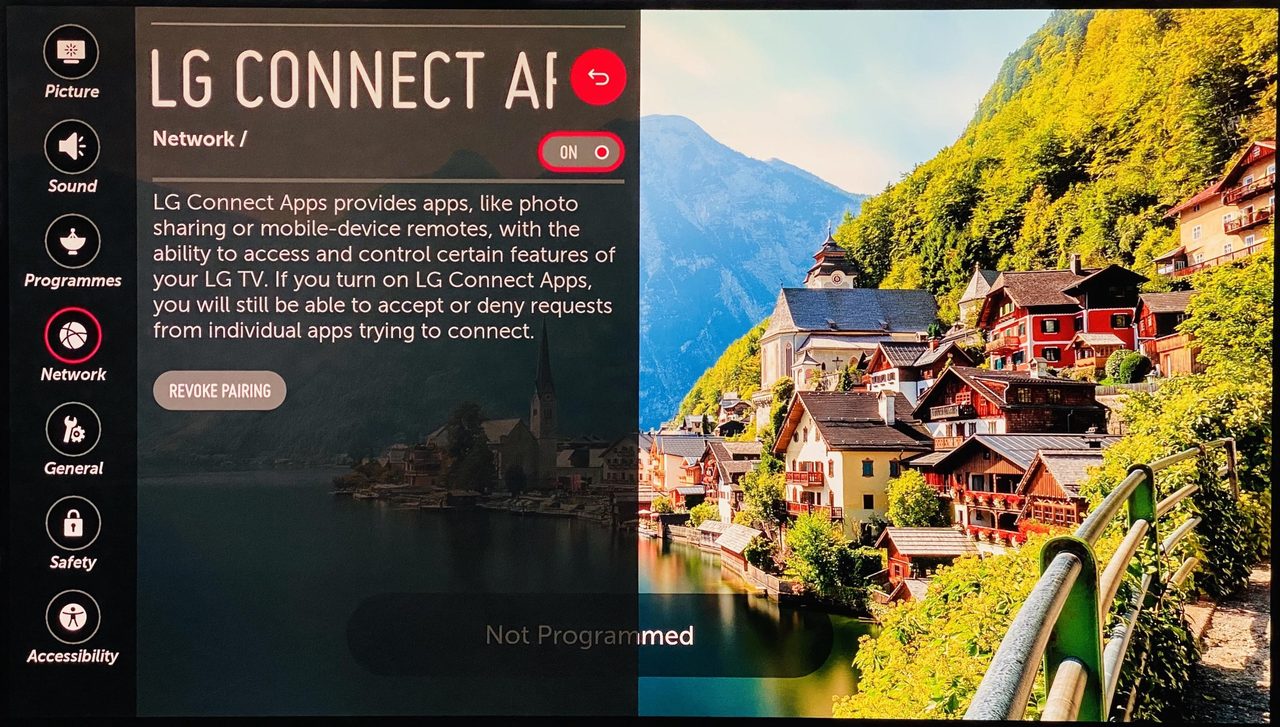
- In Hearth open Settings, System and press OK on the app-list row.
- The TV asks if it may allow the connection. Press OK on the TV.
Newer LG TVs refuse a web page's own connection. So a tiny helper that comes with Hearth makes the connection instead. This was tested on a TV that is not rooted (webOS 11.2.0, firmware 43.21.44). It may not work on every TV; if it fails, the built-in list stays. The key that pairs Hearth with the TV stays inside Hearth.
Opening Hearth quickly without root
LG Home cannot be replaced without root. The TV closes a normal app when another app opens, and an app cannot see which app is in front. Two ways to get close:
- Quick Access (any TV). Open Hearth once. Then hold a number key 1 to 9 on the remote (or open the TV's Quick Access setting) and choose Hearth. From now on, pressing that number key opens Hearth from anywhere. It starts fresh each time, so it is slower than with root.
- A second device that stays on (advanced). A small program on a Raspberry Pi or a home server watches the TV and tells it to open Hearth when LG Home shows. See webos-vibehack by OmkarK97. Not tested with Hearth.
In Hearth, Settings, System, Open Hearth without root: guide shows a short version of this.